Configuration
Most settings live on the Setup tab of the control window, where you adjust them as you prepare an event. A handful of rarely-touched options live in Preferences (File → Preferences). Everything is stored in a TOML file automatically — you never need to edit it by hand.
| Platform | Config file location |
|---|---|
| macOS | ~/Library/Application Support/milonga/config.toml |
| Windows | %APPDATA%\milonga\config.toml |
| Linux | ~/.config/milonga/config.toml |
Where each setting lives
| On the Setup tab | In Preferences |
|---|---|
| Event details (DJ name, venue, milonga name) | General (language, welcome credits, session folder) |
| DJ application & its settings | Matching (score, La Cumparsita, learning) |
| Tanda cycle | Database (recordings file) |
| Now Playing window & layout presets | Display (background images, opacity, text rules) |
Event details
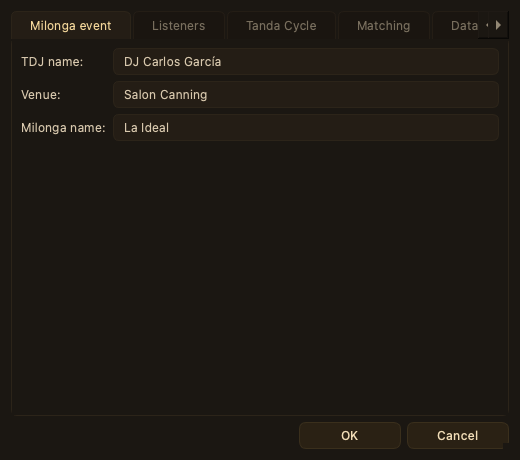
On Setup → Event:
| Setting | Description |
|---|---|
| TDJ name | Shown in the DJ name banner at the bottom of the display. Updated live — no restart needed. |
| Venue | Used in the welcome message: Welcome at [Venue]. |
| Milonga name | Used alongside the DJ name: Tonight for the [Milonga name] we welcome [TDJ name]. |
DJ application
On Setup → Event, the DJ Application group selects your software. Only one application runs at a time; use Start / Stop to control the listener.
Traktor
Milonga connects to Traktor via the traktor-nowplaying broadcast. It spawns traktor-nowplaying as a subprocess and listens on the configured TCP port (default: 8000). Click Start to begin listening.
You can also point Milonga at your exported Traktor collection with Use Traktor Metadata (see Giving the matcher more to work with).
VirtualDJ
When you select VirtualDJ, Milonga watches VirtualDJ's daily history file
(History/YYYY-MM-DD.m3u in the VirtualDJ data directory) and picks up each new track
as soon as it is written. The settings show the auto-detected paths for the history
directory and your database.xml (VirtualDJ's local track database, read by Milonga to
enrich metadata).
Tanda cycle
The carousel strip at the top of the display shows the current position in the tanda cycle. The default sequence is:
Tango · Tango · Vals · Tango · Tango · Milonga
On Setup → Event, in the Tanda Cycle table, you can add genres (Tango, Vals, or Milonga), remove entries, and drag to reorder.
Cortina detection — a track is treated as a cortina (and the cycle advances) when:
- its title carries a cortina marker (
C-prefix,***, or a leading run of dashes), or - no database match is found above the minimum match score.
La Cumparsita — by tradition the milonga closes with La Cumparsita. When a matched track's title is exactly La Cumparsita, the carousel enters its closing Cumparsita state. This can be turned off in Preferences → Matching for DJs who play the tune mid-event (see below).
Matching
In Preferences → Matching:
| Setting | Default | Description |
|---|---|---|
| Minimum match score | 68 | Fuzzy-match threshold (0–100). Tracks scoring below this are treated as cortinas. Lower values accept weaker matches; higher values are stricter. |
| Treat “La Cumparsita” as closing tanda | on | Flags a matched La Cumparsita as the closing tanda so the carousel enters its Cumparsita state. Turn off to treat it as an ordinary tango. |
| Learn from corrections | on | Loads your per-user library of learned spellings and recordings, so tracks you have confirmed before resolve instantly and the matcher improves over time. |
The matcher classifies the DJ string into typed fields (title, orchestra, singers, date, duration), corrects spelling against curated name lists, and scores candidate recordings — favouring the one matching the most fields. The whole search index is loaded into memory at startup for fast matching.
Database
By default, Milonga looks for recordings.db in its application support directory. In Preferences → Database you can point it at a different file.
The bundled database contains approximately 45 000 tango recordings:
| Genre | Recordings |
|---|---|
| Tango | 37 580 |
| Vals | 4 505 |
| Milonga | 3 139 |
Display options
In Preferences → Display you can:
- Set the Orchestra images folder and Image opacity that feed the Artwork pane — the cover-art image shown behind the track (see The display window → Artwork).
- Define text-transformation rules applied to the track title and orchestra name before they are shown.
The panes themselves are arranged on the Setup → Layout tab.
Session files
In Preferences → General you can choose the folder where session logs are recorded and read. Leave it blank to use the default (new sessions recorded locally, past sessions in Documents/Milonga Sessions). See Recording & statistics.
Language
The interface is available in English, French, and Spanish. In Preferences → General, select System default to follow the operating system locale. A restart is required after changing the language.
Layout
The five display panes can be repositioned and resized on the Setup → Layout tab, and saved as named presets. Coordinates are stored as fractions (0.0–1.0) of the display window, so the layout scales correctly at any resolution. Text zoom (10–150 %, default 75 %, on Setup → Display) scales the track info panel independently of the layout.