Milonga
Put the song on screen. Let every dancer know the tanda.
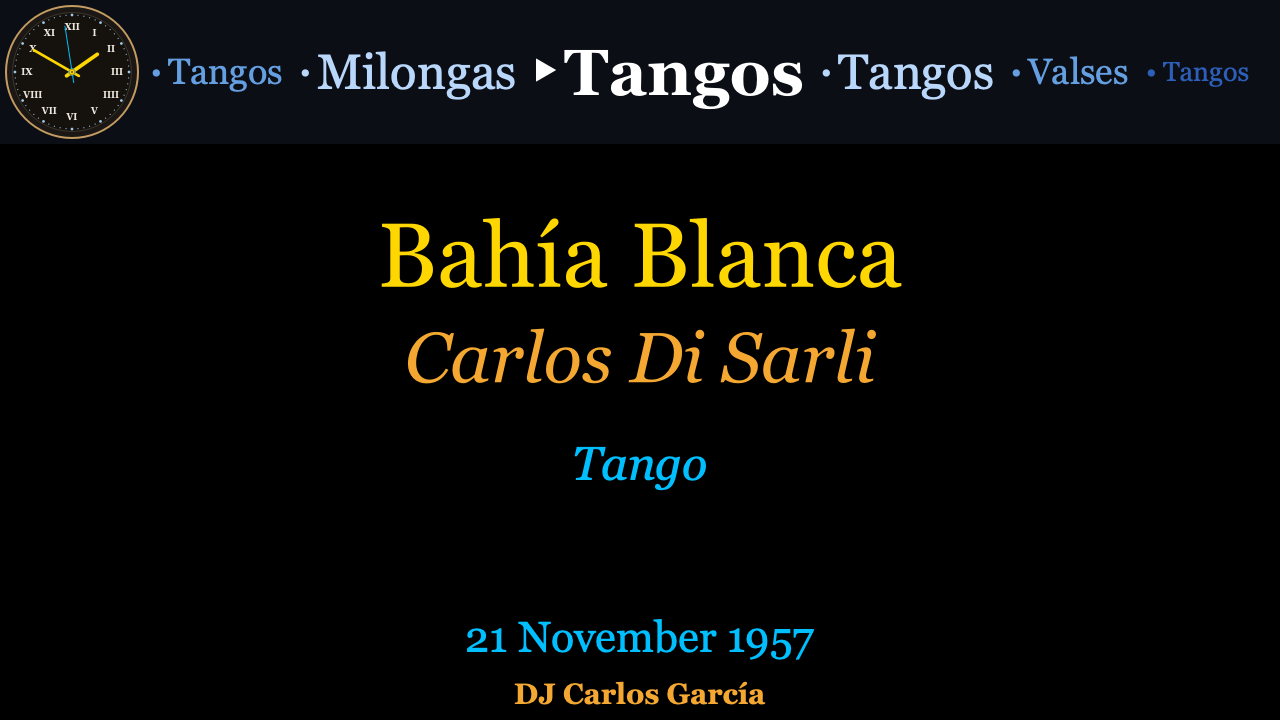
Milonga connects to your DJ application and displays the track currently playing on a second screen or projector — with full metadata: title, orchestra, singers, year, and genre. It looks up each track in a curated database of approximately 45 000 tango recordings (37 580 tangos, 4 505 valses, and 3 139 milongas) and finds the right entry automatically, even when the DJ software's metadata is incomplete or mis-spelled.
What it does
When a new track starts in your DJ app, Milonga:
- Reads the title and artist from Traktor or VirtualDJ.
- Fuzzy-searches a curated database of tango recordings.
- Updates the display window with orchestra, genre, singers, and year.
- Advances the tanda counter — and moves to the next genre when a cortina plays.
- Records the evening as you go, so you have a full log of every tanda afterwards.
The result: your audience always knows what tanda they are dancing to.
Features
- Traktor and VirtualDJ — broadcast mode for Traktor; auto-detected file mode for VirtualDJ.
- 45 000-recording database — 37 580 Tangos, 4 505 Valses, and 3 139 Milongas, curated from public tango discography sources.
- Three-tab control window — Setup before the event, Live during it, Milongas afterwards. A first-run wizard walks you through the essentials.
- Tanda cycle tracker — configurable sequence (default: Tango · Tango · Vals · Tango · Tango · Milonga). A cortina advances the cycle automatically.
- Drag-and-resize layout — position the clock, tanda carousel, track panel, artwork, and DJ name anywhere on screen, and save arrangements as named presets.
- Live correction — see every lookup with its scored candidates, and push a correction onto the display with one click.
- Learning — confirmed corrections are remembered and resolve instantly at the next milonga.
- Session log & statistics — every evening is recorded automatically; review, edit, and export your tandas (CSV, text, M3U8 playlist, or an HTML report) and see genre, orchestra, and timing breakdowns.
- Analog clock — always visible so the floor can read the time.
- English, French, and Spanish interface.
- macOS and Windows packages — no Python required.
Get started
Download the app for your platform on the Download page, then follow the Installation guide for a step-by-step setup.